
Welcome to our Nephila Web Newsletter Series, a special edition focusing on Security in the Moodle platform. In this edition, we will highlight the responsibilities of users for ensuring a secure Moodle environment and how to protect your data from cyberattacks.
Moodle is the world’s most widely used and robust open-source Learning Management System today. Schools and organizations use it daily to deliver learning and empowerment to their stakeholders in the most dynamic and efficient way. It is a highly complex web application that stores and processes massive amount of data.
Nowadays, the digital landscape is witnessing an unprecedented surge in cybersecurity attacks that transcend national borders and various industries. The Moodle platform is a highly complex web application and is not an exemption from these cybersecurity attacks. Cyber threats are everywhere, in the Philippines, there have been alarming reports of cyberattacks targeting universities, governmental bodies, and various organizations, causing widespread concern and fear.
At Nephila Web Technology Inc.- as a Moodle Premium Partner in the Philippines and your trusted partner in providing this versatile Moodle platform, security is imperative, non-negotiable, and highly significant in our processes. We emphasize security and continuously seek enhancements and improvement to it. How we assist in securing your data in Moodle? Before we answer that, and to give a better understanding of securing your Moodle environment, let me first explain the Moodle Security Tripartite Responsibility Model that we have developed in our ecosystem.
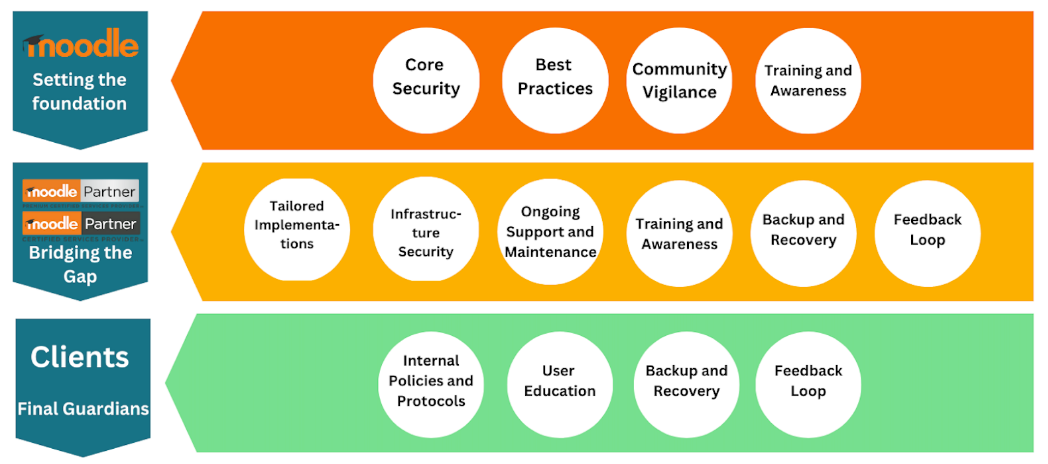
Image 1. The Moodle Security Tripartite Responsibility Model by Nephila Web Technology
The Moodle Security Tripartite Responsibility Model is a relationship model described as the collaborative effort of every stakeholder identifying each other’s responsibilities to secure the Moodle environment against cyberattacks. This model rests on the collective shoulders of Moodle, Nephila Web – as Moodle Partner and the Clients who use the Moodle platform. This model is divided into main different roles:
1. Moodle‘s Role sets the foundational security of the Moodle application.
2. The Moodle partner is the one bridging the gap.
3. The Clients are the final guardians of Moodle Security.
Let’s delve deep into this Moodle Security Tripartite Responsibility Model.
Moodle’s Role is to set the foundational security of the Moodle platform.
1. Core Security. As the creators and primary developers of the platform, Moodle regularly updates the core software to patch vulnerabilities and strengthen its inherent security features. Twice a year, Moodle releases a new version of the software, which includes the complete list of security-fixed issues from the previous versions.
2. Best Practices. Moodle offers guidelines on optimal security configurations and safe usage patterns through documentation and tutorials. Moodle announces other best practices from time to time through the publishing of new case studies at moodle.org, and you may also find Moodle’s best practices when you join the community forums.
3. Community Vigilance: The open-source nature of Moodle encourages a global community of developers and users to identify and report potential threats, contributing to the platform’s overall security.
4. Training and awareness. By organizing training sessions every now and then, Moodle equips everyone with the knowledge through Moodle Academy.
Nephila Web‘s role as Moodle Partner is bridging the gap;
1. Tailored Implementations: With their deep expertise, Moodle Partners like Nephila Web customize Moodle installations to align with an organization’s specific needs while adhering to best security practices.
2. Infrastructure Security: Nephila Web often assists in hosting Moodle on secure platforms. This includes securing the operating system, network, and application layers. We do patch management, regular backups, continuous server monitoring, authorized access management in the server, and other related security standards set forth by Moodle Headquarters. For instance, Nephila Web Technology Inc., being a Select Tier Partner of AWS, a Selected Channel Partner of Alibaba Cloud Intelligence, and a Solutions Partner of Akamai Technologies, ensures robust security measures at the infrastructure level.
3. Ongoing Support and Maintenance: Nephila Web offers ongoing support, from regular security audits to immediate threat mitigation, ensuring the platform remains fortified against evolving cyber threats.
4. Training and Awareness: By organizing training sessions, Nephila Web equips its clients with the knowledge to utilize the platform safely and efficiently, minimizing human-induced vulnerabilities.
5. Feedback Loop: Nephila Web, as a Moodle Partner, provides invaluable feedback to Moodle about potential vulnerabilities encountered by them or by its clients, aiding in the continuous improvement of security measures.
6. Backup and Recovery: While Moodle offers tools and support, it is vital for Moodle Partners to schedule regular backups and have a recovery plan in place.
Clients as Final Guardians;
1. Internal Policies and Protocols. Organizations can set strict internal guidelines on password policies, user access levels, and data sharing to enhance security. They can impose their security policies to secure processes in their Moodle site.
2. User Education: Regular training and awareness campaigns for end-users about phishing threats, safe browsing, and more can significantly reduce the risk of inadvertent breaches.
3. Feedback Loop: Clients, being the end-users, can provide invaluable feedback to both Moodle and Moodle Partners about potential vulnerabilities, aiding in the continuous improvement of security measures. Moodle has various ways of reporting feedback, one way is reporting issues to the Moodle Tracker, or posting in the community forum about the issue.
As final guardians, you may check the responsibilities for securing your data and the Moodle environment at your own level. See the checklist below;
1. Report any security issues or vulnerabilities to the Moodle Tracker at or submit in Online Security Reporting Form. You may also join the community forum for Security and Privacy.
2. Protect all traffic from your Moodle instance and users by making all pages accessible via https only. Ensure that you have coordinated this with your Moodle partner.
3. Use strong passwords for admins and teacher user roles. Choosing “difficult” passwords is an essential security practice to protect against “brute force” cracking of accounts.
4. Only give teacher accounts to trusted users. Avoid creating public sandboxes with free teacher accounts on production servers. Teacher accounts have much more liberal permissions, and creating situations where data can be abused or stolen is easier.
5. Implement strict password policies. There is a check box to determine if password complexity should be enforced or not, the option to set the minimum length of the password, the minimum number of digits, the minimum number of lowercase characters, the minimum number of uppercase characters and the minimum number of non-alphanumeric characters. If a user enters a password that does not meet those requirements, they are given an error message indicating the nature of the problem with the entered password. Enforcing password complexity and requiring users to change their initial password goes a long way in helping ensure that users choose and are, in fact, using “good passwords”.
6. Moodle Security Alerts. Register your site with Moodle.org. Registered users receive email alerts.
7. In courses, place enrollment keys on all courses or set Course Enrollable = No for all courses. Ensure the enrolment key hint is disabled (which it is by default) in Administration > Site administration > Plugins > Enrolment > Self Enrolment.
8. Nephila Web announces a scheduled update for your Moodle site. Respond to it for Moodle upgrade to a newer, stable version.
9. Review your site’s security settings (Site administration > Security), which include site-level settings and HTTP security.
10. Follow the principle of least privilege by only assigning certain capabilities and “trusted” roles (such as teacher, manager and site administrator) to users who absolutely need the privileges these roles allow. Check out Types of users to see a brief description of some of the privileges available to each Moodle role, and see more detailed information on the standard roles documentation.
As we wrap up this edition, we remain committed to keeping you informed and empowered in these dynamic times. Remember, knowledge is our strongest asset against evolving challenges. Please let us know your comments and suggestions by sending an email to info@nephilaweb.com.ph.
Thank you for trusting us and for being our valued clients.
References:
Top security tips for Moodle Administrators https://moodle.com/news/top-security-tips-for-moodle-administrators/
Site Security Settings https://docs.moodle.org/403/en/Site_security_settings
HTTP Security https://docs.moodle.org/403/en/HTTP_security

Follow Us
© Nephila Web Technology Inc. All rights reserved
Terms and Conditions